

The UniSoc Driver, also commonly known as the SPD USB Driver, is essential for connecting your UniSoc-powered smartphone, tablet, or feature phone to a Windows computer. It enables smooth USB communication for file transfer, firmware flashing, USB debugging, and other advanced operations.
Without the correct UniSoc Driver installed, Windows may fail to detect your device, showing it as an “Unknown Device” or preventing any data transfer.
How to Install the UniSoc USB Driver
Before starting the installation, make sure you have the following prerequisites:
Prerequisites
- A Windows PC (32-bit or 64-bit)
- UniSoc device with a good-quality USB cable.
- Administrator privileges on your computer.
- Download the latest UniSoc Driver package.
Steps to install the UniSoc USB Driver
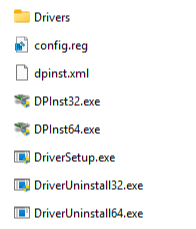
- Extract the UniSoc Driver package to a convenient location on your computer.
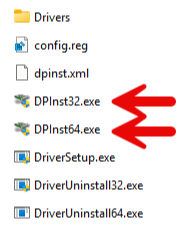
- You should see files like: DPInst32.exe (for 32-bit Windows) and DPInst64.exe (for 64-bit Windows).
- Right-click on the appropriate file based on your system: 32-bit Windows → Double-click DPInst32.exe or 64-bit Windows → Double-click DPInst64.exe. Run it as Administrator if prompted.
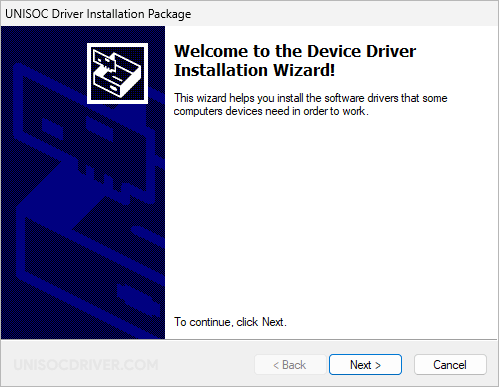
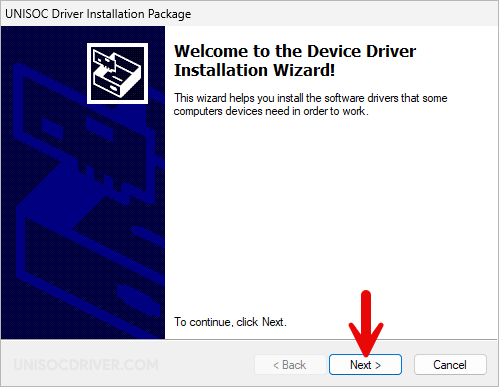
- The UniSoc Driver Setup window will appear.
- Click Next to proceed.
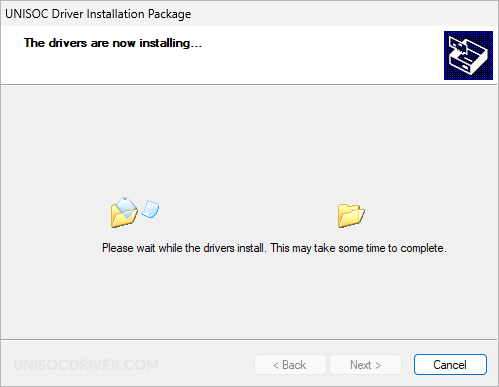
- The driver will install automatically. This usually takes only a few seconds.
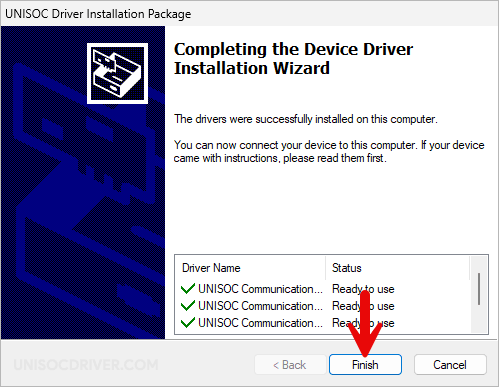
- Once finished, click Finish to close the setup window.
- Restart your PC to ensure the drivers load properly.
Troubleshooting Tips
- Driver not detected: Run the installer as Administrator or install the driver manually through Device Manager.
- Windows 10/11 security warning: If SmartScreen blocks the installation, click “Install this driver anyway”.
- Device shows as Unknown: Use the manual installation method — right-click in Device Manager → Add legacy hardware.
- Still facing issues? Download a newer version of the driver (e.g., SPD Driver R4.24.2705).
